WordPress: Calendar Booster
Last updated 01/19/2026
The Calendar Booster allows you to gate your Calendar form, requiring users to convert with Bread & Butter in order to submit your Calendar form. This tool reduces spam meeting requests, and ensures that you’re only scheduled with real users who want to talk with you.
Follow these steps to enable the Calendar Booster.
Step 1
In your WordPress admin, open the page or post that your Calendar form is embedded on.
Step 2
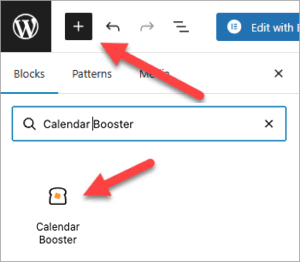
Add a new block, and search for Calendar Booster and add the block element.
Step 3
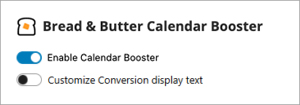
Toggle the slider to enable Calendar Conversion
Step 4
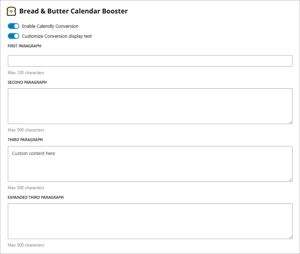
Optional - Toggle Customize Calendar Booster display text if you'd like to change the default content that appears on the form.
Note: You can edit all or some of the text fields.
Step 5
Save the page. Your Calendar form is now gated.
Don’t use Bread & Butter? Want to learn more about how Bread & Butter solves the four biggest problems facing marketers today? Book a demo and see how Bread & Butter is helping marketers make the most of their first-party data


Seeing changes in your match rates? With the end of third-party cookies & new regulations on how data can be shared (GDPR, CCPA or Data Protection Laws), what are you doing to make sure you aren’t caught out?
FUTURE PROOF YOUR DATA - LEARN MOREAdd authentication & API event tracking to your website/app with a script tag & configuration