Webflow Content Gating: Gating Webpage Access with Blur Screen Prompt
Last updated 01/25/2026
Before content gating make sure you have added the initialization script tag.
Bread & Butter’s content gate feature allows you to limit access to specific web pages on your website to visitors who have converted. If a user clicks on a link in your website to the gated webpage, the instant lead capture tool will prompt users to convert or sign in, focusing the visitor’s attention to the next steps required.

If a user tries to go directly to the gated webpage URL from an external link, or by typing it in their address bar, they will be redirected to a different page that you must specify in the script tag (see steps below).
Note: You don’t need to add the instant lead capture snippet for the Content Gating widget to work. The Content Gating tool will launch the instant lead capture pop up on its own.
You can now add the Content Gating feature to your website by following these steps:
Step 1
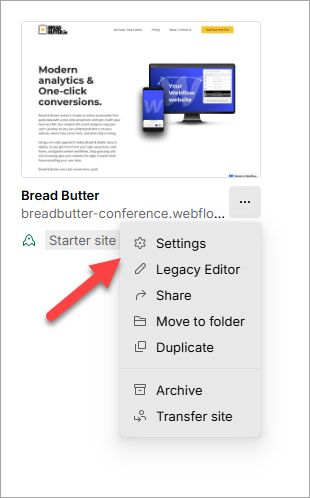
- On your Webflow Dashboard, click on the 3 dots at the bottom right of your project.
- Then, select Settings.
Step 2
Select the Custom Code from the left menu.

Step 3
In the Head Code field, paste in the following script tag after the Bread & Butter initialization script tag:
<script>
null == window.breadbutterQueue && (window.breadbutterQueue = []), window.injectBreadButter = function (e) { "undefined" != typeof BreadButter && BreadButter.init ? e() : window.breadbutterQueue.push(e) };
injectBreadButter(function () {
    BreadButter.ui.gateRoute(["GATED_PAGE_URL"], "REDIRECT_URL");
});
</script>
Note: If you have other Bread & Butter feature snippets, just add this snippet below them.

Step 4
Replace GATED_PAGE_URL with the page (or pages) you want to block unauthenticated users from visiting. Enter the URL like this:
["/work"]
Or like this for multiple pages:
["/work/project-1", "/work/project-2"]
You can also user a wildcard * to block all URLs under /work/, like /work/projects, but not including /work:
["/work/*"]
Replace REDIRECT_URL with the URL of the page you want users to be redirected to if they go directly to the GATED_PAGE_URL, from an external link. Enter the URL like this:
"/blog"
Step 5
Since the GateRoute snippet launches the instant lead capture prompt, it also takes the same Options, which you can review in step 6 here. The Options are optional, but we recommend including the following so that it launches with the blur screen focus:
show_login_focus: true
Step 6
- Click Save Changes.
- Publish your website, when ready.