Case studies · Real estate · PetersonBC
Every registration looked the same. Now Peterson knows which buyer is serious.
Peterson has projects selling and leasing in Toronto and Vancouver. For Kayleigh Johnson, Peterson’s senior director of marketing, the hardest thing to know has always been who the people behind the registrations are. Now the summary comes to her.
In their words
“It was definitely an aha moment. This is a huge component that we’ve been missing.”

01Who’s behind the registrations
From a Google search or ad to comparing penthouses: where the registrations come from.
“Paul’s been back to the site 30 times and is primarily looking at the penthouse plan, and he works as a CFO somewhere. That person is actually a really hot lead, but on traditional measures, you wouldn’t see that.”
Ask it anything
Through Bread & Butter’s MCP server, customers can connect an AI assistant such as Claude or ChatGPT and ask about visitors, leads and campaigns in plain language. Instead of navigating reports, they can ask which prospects returned this week, or which campaigns brought in engaged leads. Peterson’s team already works this way.
WHYGoogle Analytics counts the visits. It can’t tell you who came back 11 times.
WHYWhy now, what they read and a way to open, before you dial.
WHYThe seller sees who actually looked, not just how many clicked.
WHYSpend follows the sources that bring buyers, not the ones that bring clicks.
Your forms, 54 leadsSigned in with Bread & Butter, 29 leads
WHYThe people your forms miss are still people. Now they have names.
WHYEvery answer comes from the whole journey, not just the last click.
WHYDemand from the people who left their details, not from page views.
“It feels more like conversational data. I don’t need to mine this data and figure out what it means. I can just kind of speak to it.”
02What the sales team got, and what marketing learned
Sales
- Who’s behind the registration. Every one with a verified email address and a researched profile, without asking the buyer for more fields.
- The plans they keep opening. See which floor plans each buyer opens, and how often they come back to them.
- Every visit after the first. When someone who registered months ago comes back, the team sees it, along with every page they read.
- Buyers reading from away. See where buyers are reading from, including out-of-town buyers your ads bring in.
- The realtors, too. Realtors who register and keep reading show up as well. Realtors this engaged can bring buyers with them.
Marketing
- Where people raise their hand. Which pages people register on, and which ads and searches brought them there.
- The close readers who haven’t registered yet. The people who keep coming back without leaving an email, and the floor plans they’re reading.
- When an offer runs. See whether more visitors read closely, and fewer bounce, while it’s live.
- Reports you can talk to. The team asks their AI assistant what they want to know, instead of digging through dashboards.
03What Bread & Butter does once it’s installed
Works with the website you already have.
On top of your registration forms, with no code and nothing to rebuild.
Verifies and researches every registrant.
Each one arrives with a verified email address and a researched profile: the person behind the registration.
Tells your team what they want.
Each lead arrives in your CRM or your email with an Intelligence Brief: the projects and floor plans they read, how they found you, and ways to open the conversation.
Tells your team the moment they come back.
Choosing a new home takes months. When a registrant returns, your team hears about it, with the Brief updated to the plan they’re looking at now.
Gives your sales team a list every week.
Who came back, who’s ready and who’s going quiet, each with why now and what to say.
Tells you what’s working, in plain words.
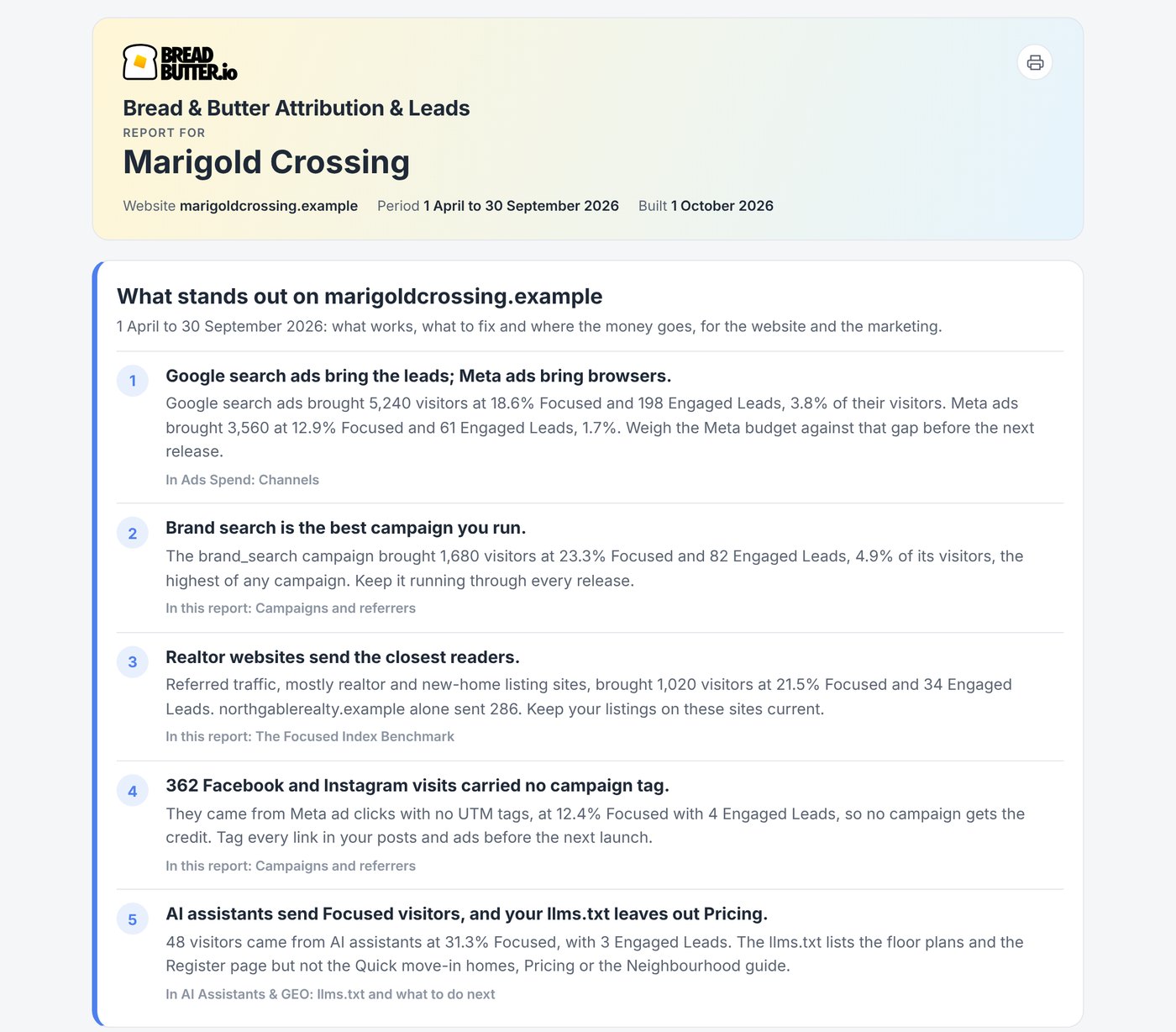
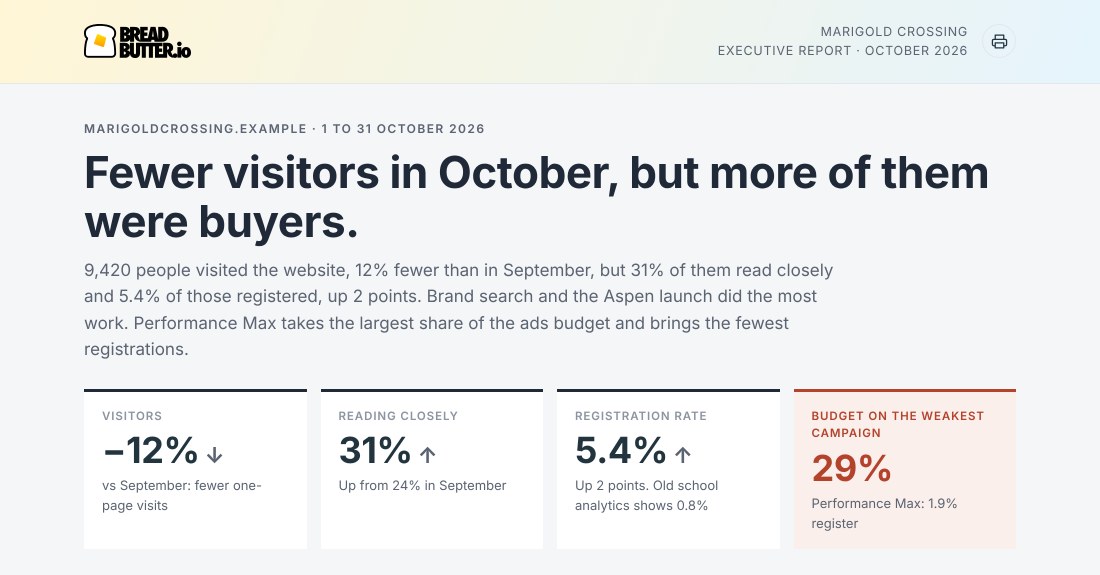
Which channels bring buyers and which bring registrations. Use any of the 15 reports, or build your own just by asking your AI assistant, for any period. No analyst, no spreadsheet.
What the reports look like (branded to your company)
Two of the 15 reports, run on a sample account. Ask your AI assistant for any of them, for any website and any period.
For your web team
Install Bread & Butter on your website
One script in the head of your site, or the plugin on WordPress. Step-by-step guides for Google Tag Manager and each website platform.
support.breadbutter.io/article/15-install-bread-butter04Getting it installed
One script, and your website stays as it is.
Whoever looks after your website adds one script, the same way they’d add any tracking script. On WordPress, it’s a plugin. Your registration forms and project pages keep working as they do now.
Start free and see who’s on your website and which channels bring them. See full pricing
Send the install guide to your web team or website provider with one click. Or ask us when you book a demo, and we’ll set it up for you with a free white glove installation.
Have more questions?
Answers live in the knowledge base.
Every article is also in your AI assistant through our MCP server: ask it how to do anything in Bread & Butter and it answers from the same pages.
Keep everything you run. Bread & Butter joins it.








































Get started
Install it. That’s the setup.
Minute one · Install
Add it to your website in a minute
Nothing to map, nothing to configure, no fields to wire up.


And everything else. See installation instructions for 40+ platforms
Day one · It starts working
Your visitors scored, more of them turned into leads
From the first visit, every visitor is recorded and scored on how ready to buy they look. Your existing forms, newsletter and checkout already count, and our one-click conversion tools catch the people your forms miss. Each lead is researched before you call: role, company, what they read.
Every day after · In your tools
Your leads arrive in your CRM, already researched
Each lead arrives in your CRM or your data warehouse as an Intelligence Brief: who they are, their company, what they read, why now, and a first line to open with. Updated every time they come back. Your key events flow back into GA4. Nothing new to open, nothing to replace, and when you want more, ask your AI assistant anything.
No credit card required. Install in 20 seconds.
Ask AI how Bread & Butter grows your pipeline

Not on WordPress? Get instructions here
© 2026 Bread & Butter IO Inc. All Rights Reserved.