LeadScore AI: How Every Visitor Gets a 1-to-10 Score
Published: July 8th, 2026
Your sales team starts most days with the same question: who do I contact first? Usually the answer comes from a gut read of a messy list, or from whoever filled out a form most recently. Neither tells you who is actually close to buying.
LeadScore AI answers the question directly. It gives every visitor on your site a score from 1 to 10 that reflects how likely they are to convert. It works for known and unknown visitors, and it updates in real time as behavior changes. Here is what the score is built from, how it gets sharper over time, and how to use it day to day.

What the score is built from
The score rises and falls based on what a visitor actually does:
Return visits. Someone coming back over several days is showing more intent than a one-time reader.
High-value pages. Time on pricing, product, and comparison pages moves a score up.
Depth of engagement. Meaningful time and interaction, not a single page load, counts.
Customer-pattern match. The closer a visitor’s behavior looks to the people who became your customers, the higher the score.
Drop-off. When someone stops engaging, the score eases back down, so your list reflects who is active now.
How it learns from you
LeadScore AI is trained on your own outcomes. When you mark a visitor’s profile as a Customer, the model studies what that person did before they bought: which pages, in what order, over how long. Every closed deal you mark sharpens the model, so each scoring cycle reflects your real buyers more closely than the last.
The practical habit: mark deals as Customer the day they close. The more you mark, the more accurate the scores become.
Where to find it
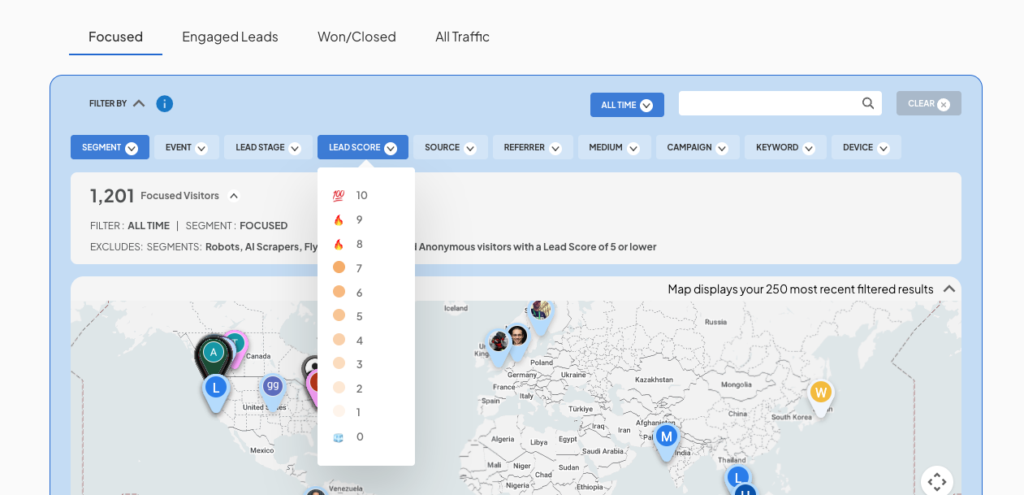
Open your Bread & Butter dashboard and sort by LeadScore, highest first. The Focused Tab, your default view, already limits the list to real prospects scored 6 or higher, so the top of that list is where your attention belongs.
How to use it
Score 8 or higher who just viewed pricing: contact today, while the intent is live.
Mid-range scores: let Nurture AI keep them warm until behavior signals they are ready.
Lower scores: not “bad leads,” often just “not yet.” Leave them in nurture rather than discarding them.
Pair with the Focused Tab: sort the Focused Tab by LeadScore to put your hottest real prospects at the very top.
Common questions
Does it score anonymous visitors? Yes. Known or unknown, every visitor gets a score. Once a visitor verifies their identity, the score is joined to a real name and company.
How often does the score update? In real time. A visitor moving from 6 to 8 is doing active research right now.
Does a low score mean the lead is bad? No. A low score usually means low readiness, not low value. Those contacts are good candidates for nurturing.
Stop guessing who to call first. [See your highest-scoring leads →]